UI Design for Agentic Appointment Scheduling
- Company
- Nuvocargo
- Role
- Sr. Product Designer
- Date
- 2025
Context
Every shipment has a pickup and a delivery, and sometimes more than one of each. Every stop needs a scheduled appointment. We automated appointment scheduling with AI agents that emailed, called, or logged into facility portals to confirm when a shipment could be picked up or dropped off.
Problem
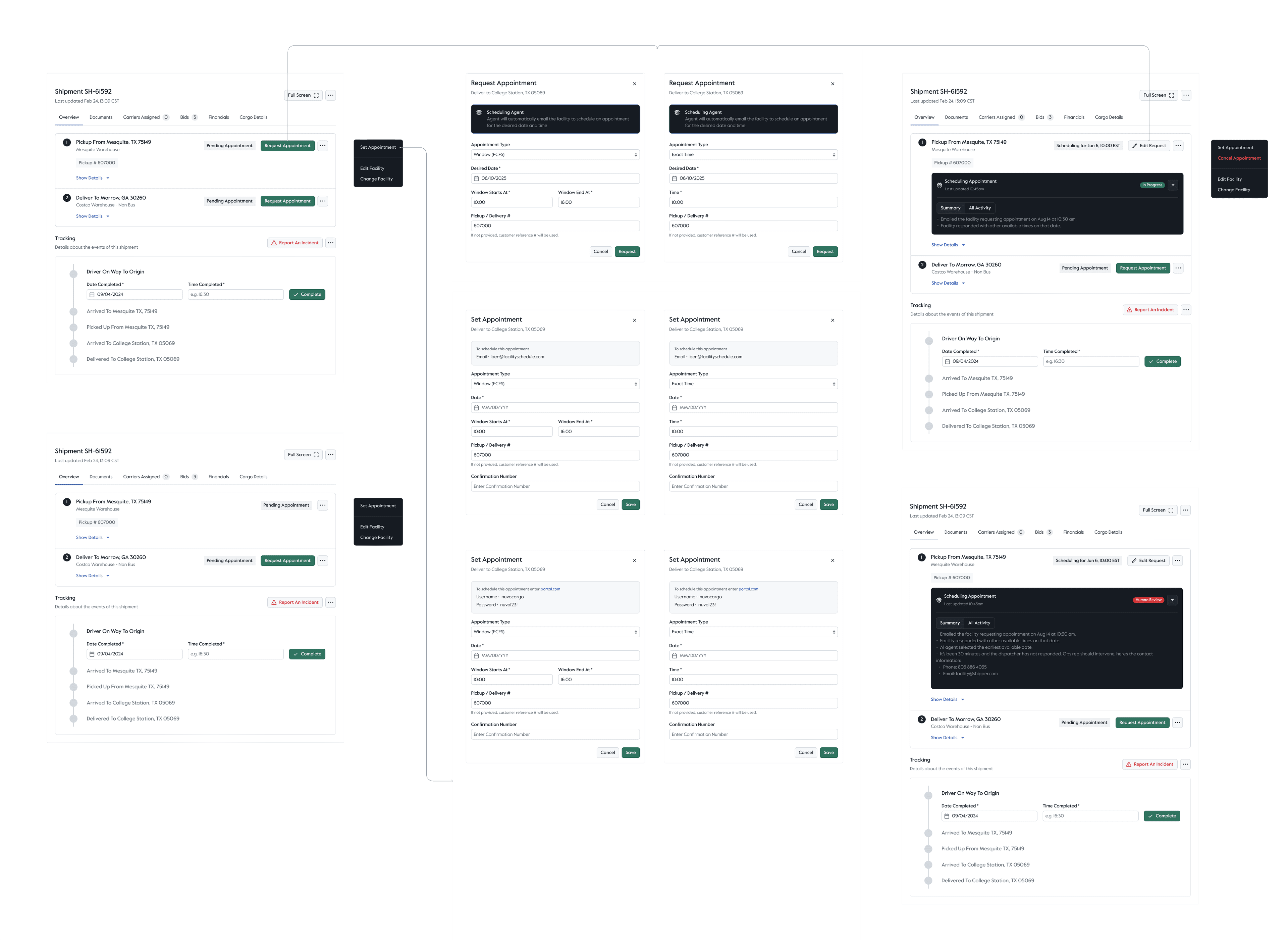
As we started implementing agentic workflows across the freight brokerage lifecycle, we needed a new way to display those automations so users could easily follow their progress. When an AI agent escalated a workflow, users needed clarity on what the issue was and what action they could take to solve it.
Process
I partnered with the engineering team building this automation to understand the different use cases and the ways appointments could be scheduled at pickup and delivery locations.
Solution
I used our design system to create new components that displayed the progress of these workflows, and the information around them, in a clear, actionable way. Users could see when an AI agent was already working on an appointment, or when there was an issue that needed to be solved. For escalations, the stop showed the facility’s contact details so the user could resolve it right away.
Outcome
Customer Ops no longer needed to contact facilities to schedule appointments, and only stepped in when human input was needed.